
How to choose a gaming mouse: grip, hand size and the specs that matter
- 14 Nov, 2026
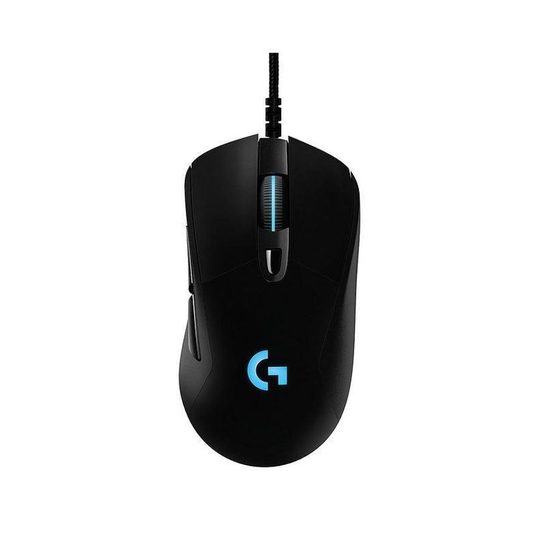
The right gaming mouse is the one that fits your hand and the way you hold it. Headline numbers such as 25,600 DPI matter far less than shape, weight and grip, and a mouse that feels wrong will never feel right however good its sensor is. This guide explains what each specification actually changes, how to match a mouse to your hand, and what to check if you are buying one as a Christmas present for someone else.
Start with your grip style
Most people hold a mouse in one of three ways. Watch how you hold your current mouse for a few minutes of normal use before you shop, because the grip decides which shapes will be comfortable.
- Palm grip: your whole hand rests on the mouse, and you move it with your arm and wrist. You need a longer mouse with a rounded back that fills your palm. Very short mice, under about 120 mm, tend to leave the palm unsupported.
- Claw grip: your palm touches only the rear of the mouse and your fingers arch at the first knuckle. A pronounced hump towards the back and a moderate length suit this grip, because the hump gives the base of your palm something to press against.
- Fingertip grip: only your fingertips touch the mouse, and you steer it with small finger movements. Low weight matters most here, along with a front end that is narrow enough to pinch.
Many players mix grips, for example palm during relaxed play and claw during tense moments. If that sounds like you, a medium length mouse with a gentle hump is the safest compromise.
Measure your hand before you compare shapes
Manufacturers publish length, width and height for every mouse, and those figures are much more useful once you know your own hand size. Lay your hand flat and measure from the crease at the base of your palm to the tip of your middle finger, then measure across your knuckles at the widest point.
| Hand size | Length | Width | What usually fits |
|---|---|---|---|
| Small | under 17 cm | under 8 cm | shorter, narrower mice; fingertip or claw grip comes naturally |
| Medium | 17 to 19 cm | 8 to 9.5 cm | most standard gaming mice, around 120 to 128 mm long |
| Large | over 19 cm | over 9.5 cm | longer, taller mice with a full back for palm grip |
These bands come from Glorious, a mouse maker, and other brands use similar ones. Treat them as a starting point rather than a rule. If you can, hold a mouse in a shop before buying, or compare its dimensions with a mouse you already find comfortable.
The specifications that matter, and the ones that do not
DPI and sensor quality
DPI (dots per inch) is how far the cursor moves for each inch of mouse movement. A high maximum looks impressive on the box, but most competitive players work somewhere between 400 and 1,600 DPI and set fine sensitivity inside the game. What matters is that the sensor tracks accurately at the setting you actually use, without acceleration or smoothing. Any current mouse from an established gaming brand will do that comfortably.
Polling rate
The polling rate is how often the mouse reports its position to the computer. 1,000 Hz, a report every millisecond, is the standard for gaming mice and is plenty for nearly everyone. Some newer wireless models offer up to 8,000 Hz, which can make a difference on very high refresh rate monitors but also uses more processor time and battery.
Weight
Lightweight mice of around 55 to 65 g have become popular, especially for first person shooters played at low sensitivity, where you sweep the mouse across the whole pad to turn. At higher sensitivity, where movements are small, the difference between a 60 g and an 85 g mouse is much less noticeable. Some mice let you add or remove weights so you can experiment.
Buttons
Two side buttons are enough for most games. Strategy and online role playing games benefit from more, sometimes a dozen on the thumb side, but extra buttons add weight and can be pressed by accident. Buy for the games you play most.
Wired or wireless
Wireless used to mean lag, but that is no longer true for mice that use a dedicated 2.4 GHz receiver: at standard polling rates their latency is comparable to a cable. Bluetooth is a different matter. It is fine for office work and casual play, but has higher latency, so avoid it for competitive games.
A wired mouse is still the cheaper choice for the same sensor and shape, and it never needs charging. Wireless removes cable drag and keeps the desk tidy, at the cost of a higher price and a battery to look after.
Matching the mouse to the rest of your setup
A mouse works together with your keyboard and desk space. If you play with your keyboard angled or use a compact layout, you gain room for wider mouse movements, which favours a lighter mouse and lower sensitivity. Our guide on how to choose a keyboard for work and gaming explains layouts and sizes, including the compact formats that free up desk space.
A good mouse mat matters too. A larger cloth mat gives a consistent surface for the sensor and room for low sensitivity play, while hard mats are faster and easier to clean.
A worked example: a classic medium sized wired mouse
To see how the figures fit together, take the Logitech G403 HERO wired gaming mouse. According to Logitech, it measures 124 x 68 x 43 mm, weighs 87.3 g with an optional 10 g weight, has six programmable buttons and a HERO 25K sensor with a range of 100 to 25,600 DPI, and polls at 1,000 Hz. Its length and rounded back suit palm or relaxed claw grip for medium hands. At that weight it is not built for fingertip grip or very low sensitivity play, but it is a sound choice for someone who wants a comfortable all rounder and does not want to charge a battery.
Buying a gaming mouse as a gift
A mouse is a personal item, so if it is a surprise, use this checklist:
- Check which hand they use. Many gaming mice are shaped for right handed users only. Left handed players need an ambidextrous or left handed model.
- Look at their current mouse. Note the brand and model and search for its dimensions. Something similar in size is the safest bet.
- Think about their games. Shooter fans tend to prefer light mice with few buttons, while strategy and role playing fans often like extra side buttons.
- Check the returns policy. Some listings are marked non-returnable, so read the shop’s terms before you order, and ask for a gift receipt where possible.
- Consider wired versus wireless. If they play on a laptop at the kitchen table, wireless is more practical; on a fixed desktop, wired saves money.
Narrow it down
Measure your hand, decide on your grip and choose between wired and wireless. That leaves a short list of shapes to compare. Then browse our gaming mice category, filter by the brands you trust and compare dimensions and weight with your current mouse before you pick one. Prices change often in November and December, so check the price and delivery time at the shop before you order.