Cooling your PC during long gaming sessions: why thermal throttling ruins live dealer streams
- 22 Jul, 2026
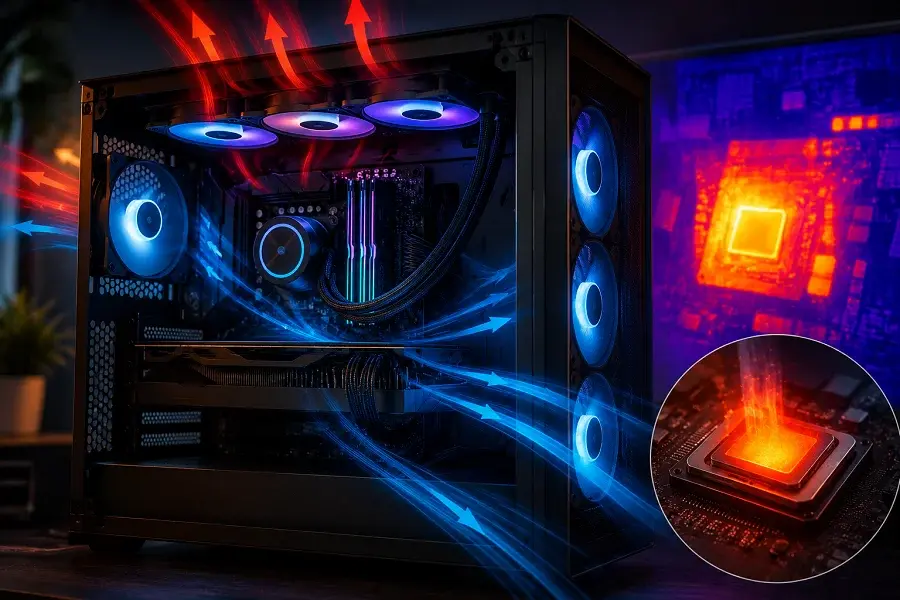
Nothing derails a good online casino session quite like a stuttering live dealer stream at exactly the wrong moment. The dealer deals the final card, the roulette wheel begins its final rotation, and your video feed suddenly drops frames or freezes entirely. Before blaming your internet connection, it is worth considering a less obvious culprit that catches out far more gaming PCs than people realise: thermal throttling. Extended sessions, whether a long evening of live dealer tables or hours spent running graphically rich slot animations, generate sustained heat that many systems simply are not built to handle gracefully. This guide explains exactly what thermal throttling is, why it hits casino gaming sessions particularly hard, and what practical steps actually solve the problem.
What thermal throttling actually is
Every processor and graphics card has a maximum safe operating temperature, and modern components are designed with an automatic safety mechanism that kicks in when they approach it. Rather than risking permanent damage from overheating, the chip deliberately reduces its own clock speed, the rate at which it processes instructions, to generate less heat and bring the temperature back under control. This is thermal throttling, and it is a genuinely sensible safety feature. The problem is that reduced clock speed means reduced performance, exactly when you are relying on smooth, consistent processing to keep a live video stream or a graphically demanding slot animation running without a hitch.
The frustrating part is that thermal throttling often happens gradually and inconsistently rather than as a single obvious event. A system might run perfectly for the first twenty minutes of a session, then begin dropping frames intermittently as internal temperatures climb, then seem to recover briefly as the throttling kicks in and cools things down, only to repeat the cycle. This start-stop pattern is a classic thermal throttling signature, and it is very easy to mistake for a connection or software problem when the real cause is heat building up inside the case.
Why casino gaming sessions are particularly vulnerable
Many people assume that online casino gaming is too lightweight to generate meaningful heat, and for basic slot games running in a browser, that assumption is often correct. Live dealer streaming, however, behaves very differently from a simple slot spin. Decoding a continuous high-definition video stream places sustained demand on your processor and, if hardware acceleration is enabled, your graphics card, for the entire duration of the session rather than in short bursts. A single hand of blackjack might last a minute, but a genuine gaming evening often means hours of continuous video decoding with no natural break for the system to cool down.
This sustained load is precisely the scenario that exposes weak cooling most clearly. Short, bursty workloads rarely generate enough heat to trigger throttling, since components have time to cool between demand spikes. A long, continuous live dealer session removes those cooling gaps entirely, which is why a system that handles everyday browsing and even casual gaming without issue can still throttle noticeably during an extended evening of live casino play.
The warning signs to watch for
Recognising thermal throttling before it ruins a session is mostly a matter of knowing what to look for. Fan noise is often the first indicator: if your system’s fans ramp up audibly and stay loud for extended periods during a live dealer session, your components are working hard to shed heat, and throttling may not be far behind if temperatures continue climbing. Visual stutter that appears gradually rather than suddenly, getting progressively worse the longer a session runs, is a stronger signal still, since it points to a cumulative heat problem rather than a one-off network hiccup.
For a more definitive answer, free monitoring software can display real-time temperature readings for your processor and graphics card while you game. Most consumer CPUs begin throttling somewhere in the region of 90 to 100 degrees Celsius, and if you watch your temperatures climbing steadily toward that range during a long session, you have found your answer without needing to guess.
Case airflow: the foundation everything else depends on
Before spending money on premium coolers, it is worth checking whether your case itself is actually facilitating good airflow. A case with too few fans, or fans positioned so that intake and exhaust fight against each other rather than creating a clear front-to-back or bottom-to-top airflow path, undermines even expensive cooling components. The basic principle is straightforward: cool air needs a clear path in, and hot air needs a clear path out, without obstruction from poorly routed cables or dust-clogged filters.
A build with two or three intake fans at the front drawing cool air in, and one or two exhaust fans at the rear and top pushing hot air out, creates the kind of consistent airflow that keeps internal temperatures stable during long sessions. This is often a more cost-effective first fix than upgrading your CPU cooler, since it addresses the environment the cooler has to work within rather than just the cooler itself.
CPU coolers worth considering
If your case airflow is already solid and thermal throttling persists, the stock cooler that came with your processor is frequently the next weak link. Stock coolers are designed to keep a chip within safe limits under typical, bursty workloads, not necessarily to handle hours of sustained, near-maximum load without any performance compromise. A mid-range tower air cooler with a larger heatsink and better fan than most stock options handles sustained loads considerably better, and for anyone building or upgrading a system specifically with long casino gaming sessions in mind, checking cooler compatibility when sourcing computer components online is worth doing before committing to a specific processor and cooler pairing.
Liquid coolers offer another step up for systems that run consistently hot, particularly on higher-end processors that generate more heat under sustained load. A closed-loop liquid cooler with a 240mm or larger radiator handles extended sessions noticeably better than most air coolers, at the cost of a slightly more involved installation.
Software adjustments that genuinely help
Hardware is not the only lever available. Many live dealer platforms allow you to adjust video quality settings, and dropping from the highest available resolution to a slightly lower one reduces the decoding workload placed on your system considerably, often without a noticeable difference in visual quality on a typical monitor. Closing unnecessary background applications before a long session, particularly other browser tabs running video or animations, frees up processing headroom that would otherwise compete with your casino platform for resources and generate additional unnecessary heat.
Choosing platforms that are kind to your hardware
Not all casino platforms place the same demand on your system. Well-optimised sites use efficient video compression and sensible default quality settings that reduce unnecessary strain on your hardware during extended sessions. An online casino such as 7inkra casino illustrates this well, with a live dealer experience built to perform smoothly across a range of systems rather than assuming every player has premium hardware, which in practice means less sustained thermal load on your components during a long evening of play.
Setting sensible limits alongside sensible cooling
A well-cooled system solves the technical side of long gaming sessions, but it is worth pairing that with the same discipline around time and budget that any responsible approach to casino gaming requires. Just as your components need planned breaks to avoid sustained thermal stress, your own sessions benefit from a predetermined time limit and budget, decided before you start rather than in the moment.
Responsible gaming for long sessions
Extended gaming sessions, even when your hardware handles them flawlessly, deserve the same sensible boundaries as any other form of entertainment spending. Set a clear budget and time limit before you begin, and treat any winnings as a bonus rather than an expectation. If gaming ever starts to feel difficult to control, free and confidential support is available. Gambling Therapy offers international, multilingual support for anyone with concerns about their own gambling or that of someone close to them.
Conclusion
Thermal throttling is one of the most overlooked causes of poor performance during long online casino sessions, quietly degrading live dealer streams and slot animations in a way that is easy to mistake for a connection problem. Solid case airflow, an adequate CPU cooler matched to your actual workload, and sensible software settings together keep your system running at full speed for the entire duration of an evening’s play, rather than gradually losing performance as the hours go on. Combined with a platform that is genuinely optimised for smooth playback, proper cooling ensures that the only thing interrupting your session is your own decision to log off.